
Hospitals, health workers and even some schemes now ask, "Do you have an ABHA number?" Many people confuse ABHA with the Ayushman card, or think it is a paid insurance product. Others have created ABHA but cannot find the card again.
This guide explains what the ABHA health card is, how it is different from the Ayushman card, how to create and download it from the official portal, and how to print it neatly in ID-card size.
Quick Answer: ABHA (Ayushman Bharat Health Account) is a free, voluntary 14-digit health ID under the Ayushman Bharat Digital Mission. Create or log in to it at abha.abdm.gov.in using Aadhaar or another allowed method, then download the ABHA card. To print it, crop it to 85.6 × 54 mm with a card cutter and print at actual size.
What Is ABHA?
ABHA stands for Ayushman Bharat Health Account. It is part of the Ayushman Bharat Digital Mission (ABDM), run by the National Health Authority. Each person gets:
- A 14-digit ABHA number – a unique health ID
- An ABHA address – an easy-to-remember ID like a username, used to share and receive health records
With ABHA, you can link your health records – such as prescriptions, lab reports and discharge summaries – from participating hospitals, labs and apps, and share them with doctors with your consent. Creating ABHA is free and voluntary.
ABHA Card vs Ayushman Card
| Point | ABHA card | Ayushman (PM-JAY) card |
|---|---|---|
| Purpose | Digital health ID for records | Health cover under PM-JAY |
| Who can get it | Any resident, voluntarily | Only eligible beneficiaries |
| Gives free treatment? | No, it is an ID | Yes, for covered treatment at empanelled hospitals |
| Official portal | abha.abdm.gov.in | beneficiary.nha.gov.in / pmjay.gov.in |
Many families have both. Having ABHA does not by itself make you eligible for PM-JAY.
How to Create ABHA
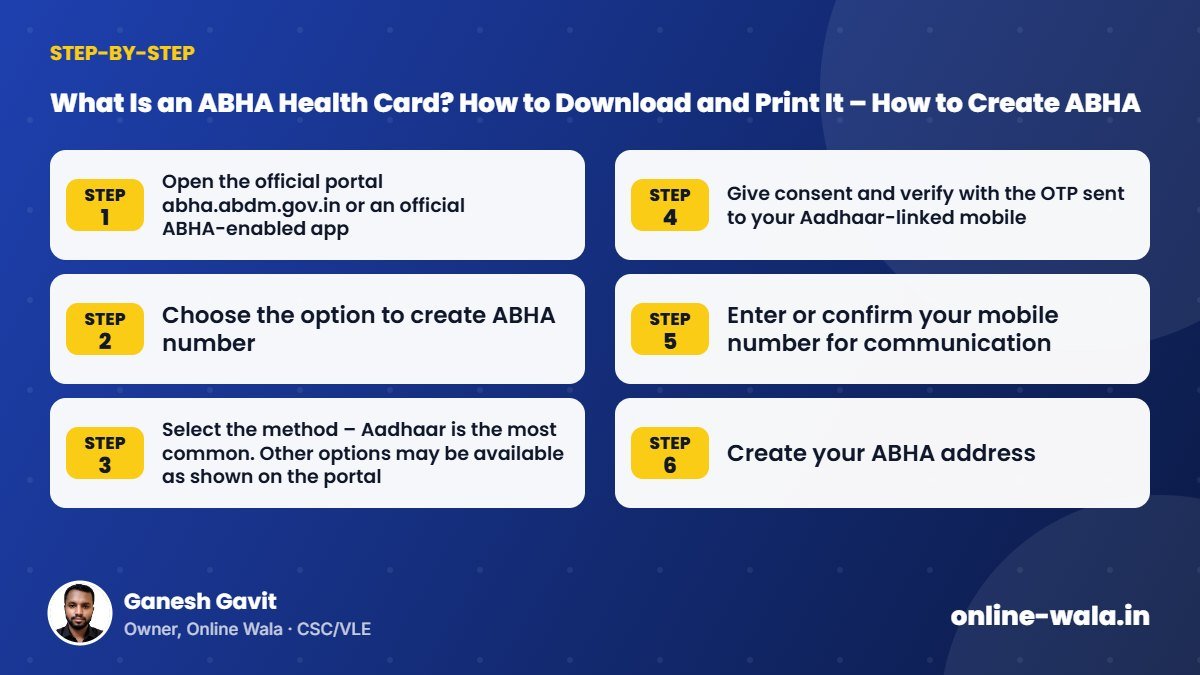
- Open the official portal abha.abdm.gov.in or an official ABHA-enabled app.
- Choose the option to create ABHA number.
- Select the method – Aadhaar is the most common. Other options may be available as shown on the portal.
- Give consent and verify with the OTP sent to your Aadhaar-linked mobile.
- Enter or confirm your mobile number for communication.
- Create your ABHA address.
- Your ABHA number is generated, and you can download the card.
Steps may change as the portal is updated. Check the official website for the latest process.
How to Download an Existing ABHA Card
- Go to abha.abdm.gov.in and choose login.
- Log in using your ABHA number, ABHA address, mobile number or Aadhaar, as offered.
- Verify with OTP.
- Open your profile and download the ABHA card.
Print Your ABHA Health Card with Our Free Tool
To turn the downloaded card into a wallet card, use our free ABHA health card print tool (ABHA Card Cutter):
- Open the ABHA Card Cutter.
- Upload the ABHA card PDF you downloaded.
- The tool crops the front and back to ID-card size. Adjust if needed.
- Choose PVC, A4 or 4×6 layout.
- Download and print at 100% / actual size.
Benefits of Having ABHA
- Records in one place: Link reports from participating hospitals and labs.
- Consent-based sharing: Records are shared only when you allow it.
- Faster registration at hospitals that use ABDM services, often through a QR code scan.
- Less paperwork: Fewer files to carry when visiting a new doctor.
How much benefit you get depends on how many hospitals and labs near you are connected with ABDM.
Common Mistakes and Myths
- "ABHA gives ₹5 lakh insurance." No. That is PM-JAY. ABHA is a health ID.
- Paying agents to create ABHA. It is free on the official portal.
- Creating multiple ABHA numbers for the same person. Use one ABHA and log in to it again.
- Sharing OTP with unknown callers claiming to be from a health department.
- Printing with "fit to page", which changes card size.
Tips for CSC and VLE Operators
- Check for existing ABHA before creating a new one.
- Explain clearly the difference between ABHA and Ayushman card to avoid false expectations.
- Help families together – create ABHA for each member who wants one, with their consent.
- Print family cards on one sheet to save time.
- Protect health data: Health information is sensitive. Delete files after printing and never share them.
- Related tool: For PM-JAY cards, use the Ayushman Card Cutter.
Real Example from Our CSC Centre
An ASHA worker brought a list of pregnant women from her village whose hospitals had asked for ABHA numbers. Some women already had ABHA created at a camp but had no copy. We logged in with each woman's mobile number and OTP, found existing ABHA numbers for most of them, and created new ones only for those who did not have one. Then we printed all the cards together. Checking first avoided duplicate IDs.
How ABHA Works When You Visit a Hospital
At hospitals and clinics that are connected with ABDM, registration can be faster. Often there is a QR code at the registration counter. You scan it with an ABHA-enabled app, share your profile, and the hospital gets your basic details without filling a long form. After treatment, the hospital can link records like prescriptions or lab reports to your ABHA, if you give consent.
Later, when you visit another doctor, you can choose to share those records. This is especially useful for people with long-term treatment who visit different hospitals, and for families who move between villages and cities for work.
Using an ABHA App
Besides the website, you can manage ABHA with official or ABDM-approved apps. In the app you can view your ABHA card, see linked records, manage consents and change settings like your ABHA address. Use only apps from trusted sources listed on the official ABDM website. Lock your phone and do not leave the app logged in on someone else's device.
Updating Your ABHA Details
If your mobile number changes, update it in your ABHA profile so that you continue to receive OTPs. Details like name and date of birth usually come from the verification document, such as Aadhaar. If those are wrong, they must first be corrected at the source, and then updated in ABHA as per the portal's options.
ABHA Checklist
- Only one ABHA number per person
- ABHA address noted down safely
- Mobile number in the ABHA profile is active
- Card downloaded and saved on the phone
- Printed wallet card for hospital visits
- Consent given only to trusted hospitals and doctors
Is ABHA Mandatory?
Creating ABHA is voluntary as per the official mission. Some hospitals or programmes may ask for it to make services faster, but you should not be denied emergency treatment for not having it. If you face such a problem, ask the hospital's help desk or check the official grievance channels.
Frequently Asked Questions
What is the ABHA health card?
It is the card for your Ayushman Bharat Health Account, showing your 14-digit ABHA number and ABHA address, used to link and share health records.
Is ABHA free?
Yes. Creating ABHA on the official portal is free and voluntary.
Is ABHA the same as the Ayushman card?
No. ABHA is a health ID. The Ayushman card is for PM-JAY health cover for eligible families.
How can I download my ABHA card again?
Log in on abha.abdm.gov.in with your ABHA number, ABHA address or mobile number, verify with OTP and download the card.
Can I create ABHA without Aadhaar?
The portal may offer other options, such as driving licence or mobile-based methods. Check the official portal for current options.
What size is the printed ABHA card?
Our tool prints it at the standard ID-1 size of 85.6 × 54 mm.
Is my health data safe with Online Wala?
The tool only processes the card PDF to cut it for printing. Never share OTPs or passwords with anyone.
Conclusion
The ABHA health card is a simple step toward keeping your health records organised and easy to share with doctors. Create it free on the official portal, use only one ABHA per person, and keep a printed card handy. Our free ABHA health card print tool makes that quick.
Online Wala is not affiliated with the National Health Authority or any government department. Check the official website for the latest process.

Ganesh Gavit
Owner, Online WalaFounder of Ganesha Digital. Creates software, apps and ready-to-use templates for businesses, students and CSC/VLE operators.